Editing
Syntax highlighting covers paths, directives, values, comments, braces, and embedded shell blocks. It is theme-neutral and works before the extension activates.
Language help
Section titled “Language help”Completion suggests directives and values that make sense at the cursor. Hover describes directives and important arguments. Signature help shows argument shapes while a directive is being written. Document symbols and folding follow logrotate stanzas and script blocks.
Diagnostics and formatting
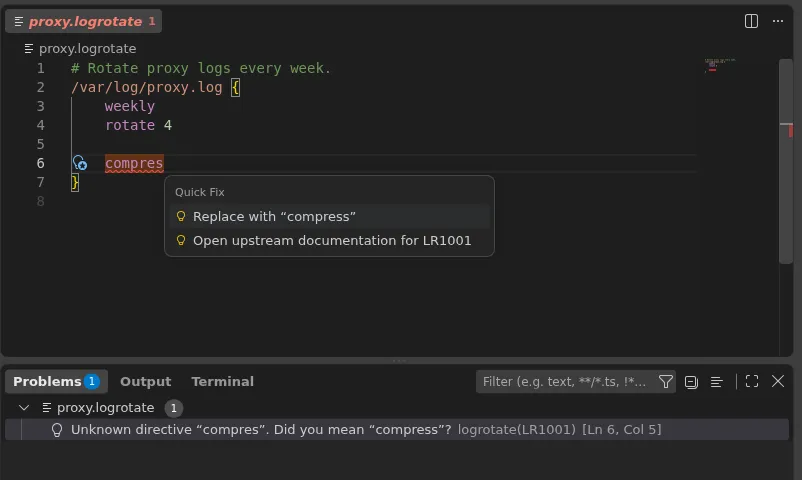
Section titled “Diagnostics and formatting”Diagnostics report unknown directives, invalid arguments, misplaced settings, missing terminators, and unsafe combinations. A diagnostic is conservative when the answer depends on the target machine. Safe quick fixes can correct a close spelling, add a prerequisite, close a block, or update an explicitly selected path.
Formatting preserves comments, quoting, and the bytes inside script bodies. It adjusts configuration indentation and spacing but does not reorder directives. Run Format Document from the Command Palette or the editor context menu.
Includes and documentation
Section titled “Includes and documentation”Includes are analyzed through Visual Studio Code’s filesystem API. Opening an included file assigns
the Logrotate language and reports diagnostics on that file. Changes to loaded include files refresh
the affected root configurations. An include is an explicit part of the Logrotate configuration,
so it remains available when Git ignores the target or VS Code hides it with files.exclude.
Directive documentation actions open the reviewed upstream logrotate manual. The extension models
syntax through logrotate 3.22 and can use the installed version for the auto target when the
workspace and host permit it.